Up to now miniKar doesn't recognize chromosomes. It is used to build a training set for :
supervised learning.
features selection
miniKar can be configured with a configuration file which specify the path to the chromosomes images and the categories of of the training set (but also the size and positions of the red areas, representing the categories).
By varying, the number of categories, it is already possible to perform by hand, a real karyotyping, even there is no tool to resolve overlapping chromosomes.
To use miniKar, three files must be in the same directory:
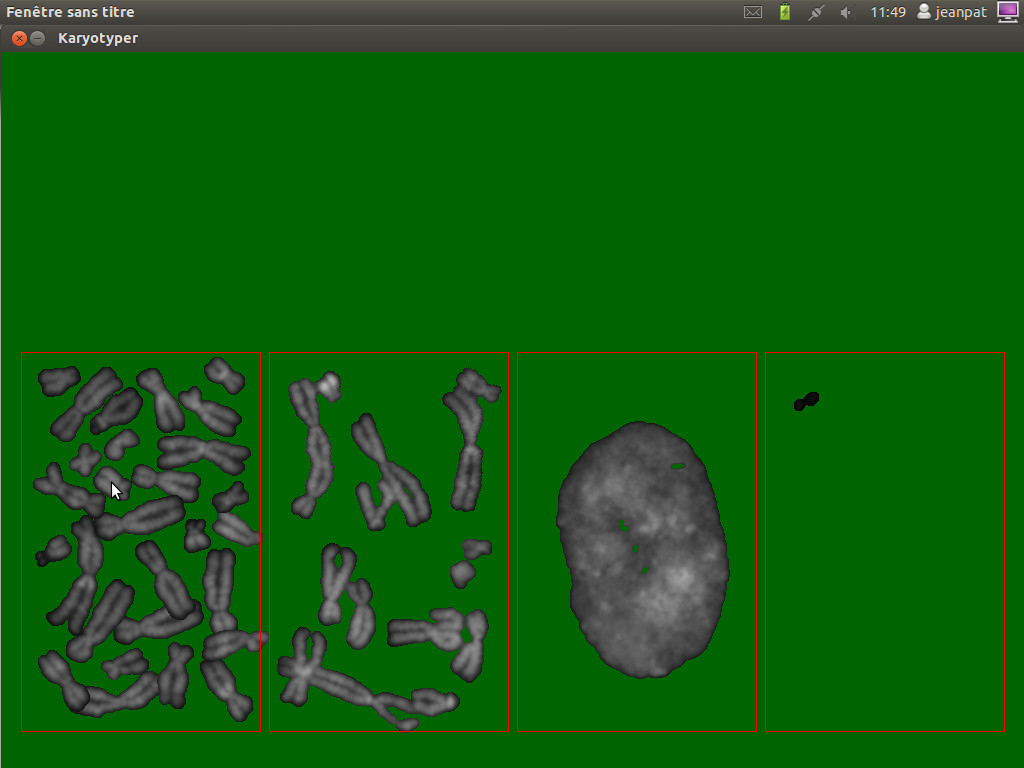
Run minikar.py from a console by : python minikar01.py or from your favorite IDE (spyder, ninja-ide,...). Something like this should be visible:
The green background is uggly, but the small things are visible. After having classified the different chromosomes, one can have :
On pressing the keyboard Esc, minikar save a first file which associes the file name of a particle and its category and produce a second one in the csv format.
To classify the chromosomes from several metaphases, the configuration.cfg file must be modified for each metaphase:
field_list=1
To classify the metaphase 13 in the folderexampleslide, modify the file as:
field_list=13
If features are computed for each particle, then they can be associated to a category for further processing with a classifier. Here, chromosomes from 14 metaphases were classified, five features related to the convex hull were used.
The following script handles a list of two chromosomes in order to set them in one of the two categories: "single chromosome", "overlapping chromosomes". The chromosomes are displayed in the upper part of the screen, there are three categories (red squares) available:"single chrom", "overlapping chrom" or "other stuff, ex nuclei". Just drag and drop the chromosomes in the red squares to classify them.
The script records the classification (press esc) in a configuration file located in the same directory. Here, there is two particles (part12.png or part15.png) obtained from a previous image segmentation. The classifier stores, in the file shape.cfg,the result as:
[part12]
shape type = overlapping

[part15]
shape type = single
# -*- coding: utf-8 -*-
"""
Created on Mon Sep  5 15:44:42 2011

@author: jean-pat
"""
#!/usr/bin/env python
#
import os, pygame
import ConfigParser as CfgP
from pygame.locals import*

#def makeCfgFile():
#    config = CfgP.RawConfigParser()
#    config.add_section('shape classifier')
#    config.set('shape classifier', 'ref', '')
#    config.set('shape classifier', 'shape type', '')
#    return config

def saveCfgFile(cfgfile,IKromList):
    for s in IKromList:
        print "saving config"
        cref=s.ref
        ctype=s.ref
        config.set('shape classifier', 'ref', cref)
        config.set('shape classifier', 'shape type', ctype)
        config.write(open('shape.cfg','w'))

def load_image(name, colorkey=None):
    fullname=os.path.join("data", name)
    try:
        image=pygame.image.load(fullname)
    except pygame.error, message:
        print "Impossible de charger l'image:",name
        raise SystemExit, message
    image = image.convert()
    if colorkey is not None:
        if colorkey is -1:
            colorkey = image.get_at((0, 0))
        image.set_colorkey(colorkey, RLEACCEL)
    return image, image.get_rect()


class Ichrom(pygame.sprite.Sprite):
    def __init__(self,image,ref,initpos):
        pygame.sprite.Sprite.__init__(self)
        self.ref=ref#particule name
        self.type=""
        self.pos = initpos
        self.image,self.rect=image
        #print "self.rect",self.rect,"-self.image:",self.image
        self.button=(0,0,0)#mouse buttons not pressed
        #self.selected = 0
        self.mouseover=False
        self.focused=False
        self.rect.topleft=initpos
        print "init chrom at ",self.pos
    def rollover(self):
        """Test if the mouse fly over the chromosome
        self.mouseover==True if mouse flying over the chrom,
        False if not"""
        mpos=pygame.mouse.get_pos()#mouseposition
        #test if mouse roll over the sprite
        if self.rect.collidepoint(mpos):
            self.mouseover=True
        else:
            self.mouseover=False
    def update(self,classifiergroup,background):
        self.button=pygame.mouse.get_pressed()
        mpos = pygame.mouse.get_pos()
        self.selected=self.rect.collidepoint(mpos)
        #the mouse flies over a chromosome
        if (self.mouseover):
            #print "mouse pos:",mpos
            collision=pygame.sprite.spritecollide(self,classifiergroup,False)
            #collision should contains only one element
            if len(collision)>0:
                #print collision[0].category
                self.type=collision[0].category
                print "particle "+self.ref+" is classified to "+self.type
            if self.button==(1,0,0):
                pos = pygame.mouse.get_pos()
                self.rect.center = pos

class Classifier(pygame.sprite.Sprite):
    '''When a chrom is moved is moved into a category '''
    def __init__(self,initpos,category):
        pygame.sprite.Sprite.__init__(self)
        self.category=category
        self.image = pygame.Surface((100,100))
        self.image.set_colorkey((0,0,0))
        self.image = self.image.convert_alpha()
        self.rect= self.image.get_rect()
        #pygame.draw.rect(screen, color, (x,y,width,height), thickness)
        pygame.draw.rect(self.image, (255,0,0,255), (0,0,100,100),1)
        self.rect.topleft= initpos

    def update(self):
        pass
        #self.pos = (10,10)
        #pygame.draw.rect(self.image, (255,0,0,255), (10,50,100,100),2)
    def trainClassifier(self):
        """the particles moved inside the square are set into one
        category"""
        pass

def main():
    pygame.init()
    screen = pygame.display.set_mode((320,300))
    pygame.display.set_caption("Karyotyper")
    pygame.mouse.set_visible(True)

    background = pygame.Surface(screen.get_size())
    background = background.convert()
    background.fill((0, 0, 0))

    screen.blit(background,(0, 0))
    pygame.display.flip()

    i1=load_image("/home/claire/Applications/ImagesTest/jp/Jpp48/13/DAPI/particules/part15.png", -1)
    i2=load_image("/home/claire/Applications/ImagesTest/jp/Jpp48/13/DAPI/particules/part12.png", -1)
    chr1 = Ichrom(i1,"part15",(0,0))
    #chr1 = Krom(i1,(0,0))
    chr2=Ichrom(i2,"part12",(30,30))
    #chr2=Krom(i2,(30,30))
    categ1=Classifier((5,150),"single")
    categ2=Classifier((110,150),"overlapping")
    categ3=Classifier((215,150),"other stuff")

    allsprites = pygame.sprite.RenderPlain((chr1,chr2))
    allcategories=pygame.sprite.RenderPlain((categ1,categ2,categ3))
    clock = pygame.time.Clock()

    config = CfgP.RawConfigParser()
    while 1:
        clock.tick(60)
        for event in pygame.event.get():
            if event.type == QUIT:
                return
            elif event.type == KEYDOWN and event.key == K_ESCAPE:
                spritelist=(chr1,chr2)


                #building a config file
                for s in spritelist:
                    print "saving config"
                    cref=s.ref
                    ctype=s.type
                    config.add_section(cref)
                    config.set(cref,'shape type', ctype)

                config.write(open('shape.cfg','w'))
                print "config saved"
                return
            if event.type ==pygame.MOUSEBUTTONDOWN:
                #need to be modified to handle a list of chromosomes
                chr1.rollover()
                chr2.rollover()

        allsprites.update(allcategories,background)
        allcategories.update()
        ##
        ##Search which chromosome is moved
        ##into which category and classify
        ##that chromosome in that category
#        collision=pygame.sprite.groupcollide(allcategories,allsprites,False,False,None)
#        for classified in collision.keys():
#            print classified
        screen.blit(background,(0,0))
        allsprites.draw(screen)
        allcategories.draw(screen)
        pygame.display.flip()

if __name__ == '__main__': main()
I fixed a bug in the makeMosaic function in the script used to build a chromosomes gallery. Instead of removing, too small or to large particles from a list, now the makeMosaic function build a new list of filtered particles (chromosomes). The script was modified to display chromosomes in inverse DAPI with
Using the previous code on a real metaphase image, chromosomes can be isolated:
Partial gallery of extracted particles (made with make montage in ImageJ)
The gray level image:
The labelled image:
The code of the python script to extract particles from an image is modified quick and dirty such:
path='/home/claire/Applications/ImagesTest/JPP60-3/DAPI/'
lab=readmagick.readimg(path+'dapilabel.png')
img=readmagick.readimg(path+'dapi.png')
if __name__ == "__main__":
    Particles=extractParticles(img,lab)
    for i in range(0,len(Particles)):
        file='part'+str(i)+'.png'
        readmagick.writeimg(Particles[i].astype(np.uint16), path+file)